Common JWT Attacks in .NET APIs (and How to Block Them)


If you're like me, whenever you watch a video tutorial about building .NET APIs, the teacher always gives you the minimum information necessary and seldom explains why you should do something.
It's always like: "Here's this cool feature and everybody says you should learn it, Bro". And you learn this cool new thing but at the same time you feel like you actually learned nothing.
Well, when it comes to authentication, it gets even worse. Most tutorials skip it entirely. And then your boss comes up to you and says: "Make sure it's secure!" and you frantically look for some code that you can copy and paste. You find something from an old 2022 tutorial that looks about right and when you're done, you've finally got a secure API, right? Right?
And that's what this blog is about. Nobody's giving you real workable information about authentication in .NET. What's more, nobody is explaining why you do or don't do specific things when setting up authentication.
So, I guess that's why you're here: To do something about that uneasy feeling in your guts that maybe your API isn't secure. I'm assuming that you just want to be a good developer and make good, secure applications.
Anyway, this article is about all of the things that those copy and paste coders get wrong regarding JWT authentication in .NET and how to fix them, so your API actually stays secure.
I've identified four common problems. So let's go through them!

#1: Not verifying the signature
The thing that makes JWTs so cool is that they are stateless. You don't need to store them in a database and check it every time the client sends one to you.
When you create a JWT, you cryptographically sign it and all you need to do to validate it is to verify that you signed it in the first place.
But if you're not checking the signature when you receive a JWT from your client, you're just shooting yourself in the foot.
An attacker can just take a valid JWT from your API, Base64URL-decode the payload, change "role": "user" to "role": "admin", re-encode it and send it back. Then it's game over. If you're not checking the signature, the attackers have admin access to your apps and you're probably losing your job.
That's why it's vitally important that you verify the signature on the JWT when you receive it. Luckily, you don't need to do it manually, there's just a small amount of configuration that you need to do when you set up authorisation on the API:
builder.Services.AddAuthentication(JwtBearerDefaults.AuthenticationScheme)
                .AddJwtBearer(options => { ... }); // JwtBearerOptions
The main part of your configuration involves setting the TokenValidationParameters on the JwtBearerOptions that you define in AddJwtBearer.
There are all sorts of Validate this and Valid that parameters. But for the purposes of this section of the article, the two important lines are:
options.TokenValidationParameters = new TokenValidationParameters
{
    ValidateIssuerSigningKey = true,
    IssuerSigningKey = new RsaSecurityKey(rsa.ExportParameters(false))
};
It's not important right now if we're talking about asymmetric or symmetric signing algorithms, however I will mention asymmetric signing below, because it's part of another potential attack vector.
What's important is that we validate the signing key and then provide the signing key that we signed the JWT with. Then the authentication middleware can use it to verify the tokens it receives.
You may look at the code in my previous article and discover that the two lines mentioned above are not actually there. That's because recently we've been discovering the wonderful world of JWKS; in which case, all we need to do is:
options.TokenValidationParameters = new TokenValidationParameters
{
    ValidateIssuer = true
};
options.Authority = "https://localhost:5001";
In this scenario, the middleware will set ValidateIssuerSigningKey = true and IssuerSigningKeys = keys from the JWKS endpoint for you behind the scenes. So, if you're implementing JWKS and want to be extra-certain that you're safe from this attack, you can just do this:
options.TokenValidationParameters = new TokenValidationParameters
{
    ValidateIssuerSigningKey = true,
    ValidateIssuer = true
};
options.Authority = "https://localhost:5001";
If you're not using JWKS to discover your authentication server, configure it like I showed you in this article. If you want to see the whole basic implementation, you can refer to my third article entitled: "Build a Secure .NET Minimal API with JWT Authentication – Step by Step".

#2 The "none" algorithm attack
This one shouldn't be a problem if you're using a modern version of .NET, but if you're maintaining legacy applications, you should check your code for this vulnerability.
In modern .NET; we're talking ASP.NET Core 3+ / NET 5+, this attack doesn't work by default. But you need to understand how it works and why to avoid making mistakes.
As I described in the second article of this blog, a normal JWT is structured like this:
header.payload.signatureThat is, two JSON objects serialised and encoded (the header and payload), joined with a dot. Then both together hashed, signed and encoded (the signature) and then joined with a dot.
The JWT specification (RFC 7519), section 6, does say that you can define a JWT without a signing algorithm. That is, you set the header "alg": "none" and that means the signature is not required.
In my opinion, that defeats the point of a JWT. However, in the early implementations of JWT authentication, this was allowed.
Again, it allows attackers to decode and deserialise your token's payload, change its claims and then serialise and encode it again without the authentication framework even checking it.
Even worse, you could remove the signature from JWT completely and authentication will still accept the token! So this is a serious exploit.
Let me demonstrate. Remove the SigningCredentials from the token:
var tokenDescriptor = new SecurityTokenDescriptor
{
    IssuedAt = now,
    Expires = now.AddMinutes(30),
    Issuer = "https://localhost",
    Audience = "https://localhost",
    Subject = new ClaimsIdentity(claims),
    // SigningCredentials = new SigningCredentials(rsaKey, SecurityAlgorithms.RsaSha256)
};
Then generate the token and paste it into jwt.io:
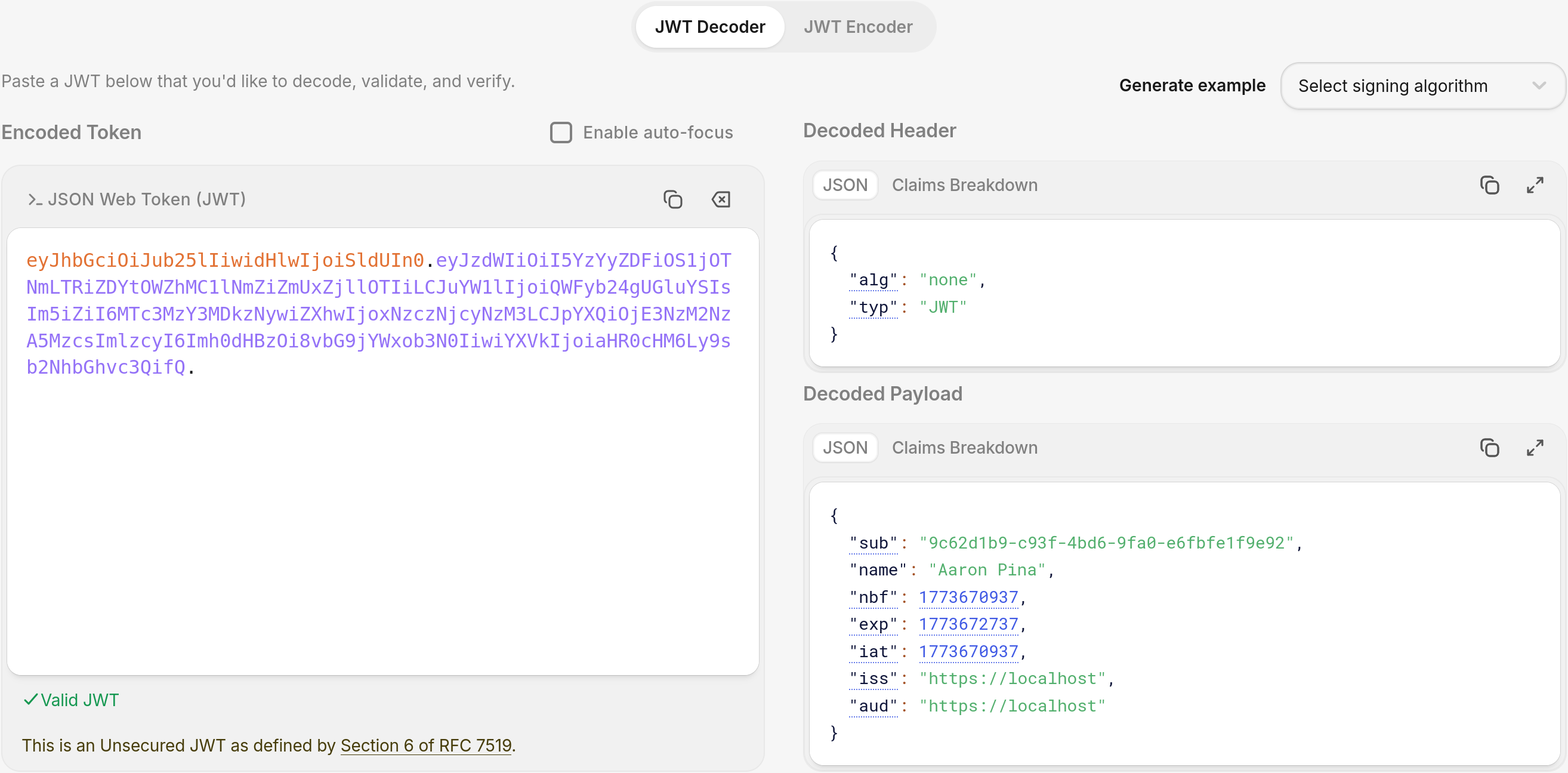
You get a JWT with no signature and "alg": "none" as we might expect.
Now, if you take your normal TokenValidationParameters and modify them like this:
options.TokenValidationParameters = new TokenValidationParameters
{
    ValidateIssuer = true,
    ValidIssuer = "https://localhost",
    ValidateAudience = true,
    ValidAudience = "https://localhost",
    ValidateLifetime = true,
    ValidateIssuerSigningKey = true,
    RequireSignedTokens = false, // NEVER DO THIS!
    IssuerSigningKey = rsaPublicKey,
    ClockSkew = TimeSpan.FromMinutes(5)
};
And then you call your simple protected endpoint:
app.MapGet("/protected", () => "Secret data!")
   .RequireAuthorization()
You see that we get the Secret data! anyway:
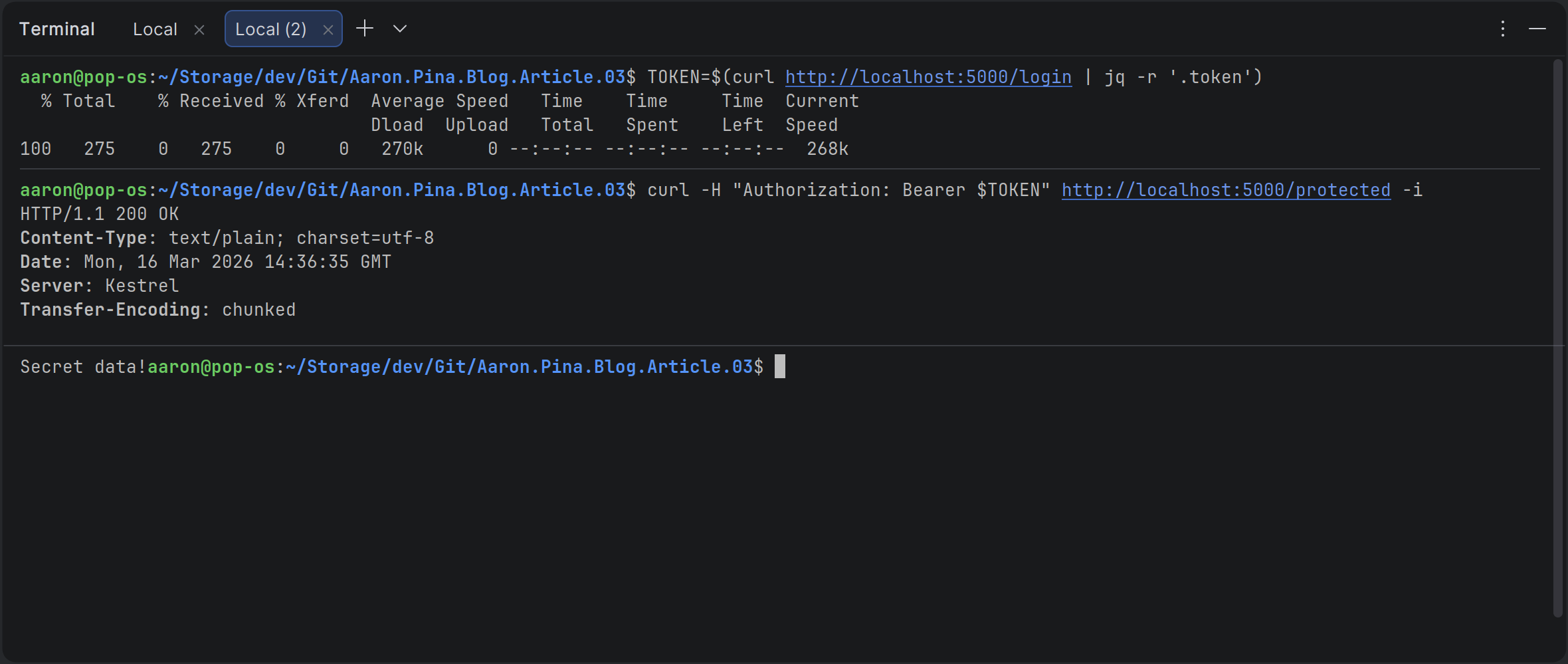
Important: This only worked because I deliberately set RequireSignedTokens = false which you should never do in production, in addition to providing a signing key, which confused the validator.
In standard configurations like our recent JWKS setup, tokens get rejected early with a signature validation failure. So either manually set RequireSignedTokens = true in your TokenValidationParameters or at least just don't set it to false.
Fortunately, as I said at the beginning of this section, in modern .NET, the default setting is RequireSignedTokens = true, so just leave it that way.
If you want to be extra, extra safe, you can whitelist the algorithms you support like this:
options.TokenValidationParameters.ValidAlgorithms = new[]
{
    SecurityAlgorithms.RsaSha256,
    SecurityAlgorithms.RsaSha512
};
Then the middleware implicitly rejects "alg": "none", since it's not in the list.

#3 Weak or guessable HMAC (HS256) secrets
So far in this article series I've only talked about asymmetric signing using the RSA256 algorithm. This algorithm produces a public and a private key. You keep the private key secret and expose the public key, which clients can then use to verify the JWT.
However, there is also symmetric signing, usually using HMAC256, which you would implement like this:
var key = Encoding.UTF8.GetBytes("SuperSecret12345");
var hmacKey = new SymmetricSecurityKey(key);
var tokenDescriptor = new SecurityTokenDescriptor
{
    ...
    SigningCredentials = new SigningCredentials(hmacKey, SecurityAlgorithms.HmacSha256)
};
Whenever I see tutorials demonstrating JWT using symmetric signing, the secret as always something banal, and I shiver as I imagine someone literally copying it from the tutorial and then pushing the API to production.
The problem is that even a 16 character-long string can be cracked, especially if it's just a normal sentence. With a weak secret string, Hashcat on a decent GPU can make millions of attempts per second. A sixteen character alpha-numeric secret might fall in hours or days, and then the attacker can forge access tokens forever and have unlimited access to your API.
It may even be the case that you store the secret string in appsettings.json and it gets exposed on GitHub. If that happens, then you're totally screwed, because you can never get rid of it from the public record.
If you're following Microsoft's advice, you'll be using asymmetric algorithms like RSA256 or ECDSA256 (Elliptical Curve Digital Signing Algorithm), not a symmetric algorithm.
But if you find yourself working with a symmetric algorithm anyway, there are two safeguards that I can offer:
- Use a random key.
- Store it in .NET User Secrets, Azure Key Vault or an Environment variable. Never put it where it'll get committed to Git.
To create a nice safe key, it's easy to create a random 32 byte (256 bit) key, like this:
var key = new byte[32];
RandomNumberGenerator.Fill(key);
That will make sure that your key can never be cracked, even with the most sophisticated of algorithms and unlimited time.
Lastly, as I was saying over the past couple of JWKS articles, rotate keys (for example every 90 days) and allow them to be revoked if you find out they've been compromised.

#4 Missing claim validation
Honestly, I think Microsoft has done a good job of designing the authentication system in ASP.NET Core. As long as you configure it right, it's quite easy to produce a secure system.
However, from my experience, many developers don't understand what validation parameters to set, what values to give them or even what they do. Then they either don't set them at all or just set them wrong.
I'll make some demos to show what I mean. The code can be found at:
https://github.com/aaroncpina/Aaron.Pina.Blog.Article.10
Demo #1: The default settings are safe
Here is the first authentication API. It's exactly the same code we've been using throughout most of the articles in this series. The main differences are:
- Nothing is explicitly configured in the
TokenValidationParametersexcept signature validation. - No audience or issuer claims are added in the JWT.
using System.IdentityModel.Tokens.Jwt;
using Microsoft.IdentityModel.Tokens;
using System.Security.Cryptography;
using System.Security.Claims;

using var rsa = RSA.Create(2048);
var rsaKey = new RsaSecurityKey(rsa);
var rsaPublicKey = new RsaSecurityKey(rsa.ExportParameters(false));

var builder = WebApplication.CreateBuilder(args);

builder.Services.AddAuthentication("jwt").AddJwtBearer("jwt", options =>
{
    options.TokenValidationParameters = new TokenValidationParameters
    {
        ValidateIssuerSigningKey = true,
        IssuerSigningKey = rsaPublicKey
    };
});
builder.Services.AddAuthorization();

var app = builder.Build();

app.UseAuthentication();
app.UseAuthorization();

app.MapGet("/token", () =>
   {
      var now = DateTime.UtcNow;
      var tokenDescriptor = new SecurityTokenDescriptor
      {
         IssuedAt = now,
         Expires = now.AddMinutes(30),
         Subject = new ClaimsIdentity([new Claim("sub", Guid.NewGuid().ToString())]),
         SigningCredentials = new SigningCredentials(rsaKey, SecurityAlgorithms.RsaSha256)
      };
      var handler = new JwtSecurityTokenHandler();
      var token = handler.CreateToken(tokenDescriptor);
      var jwt = handler.WriteToken(token);
      return Results.Ok(new { token = jwt });
   })
   .AllowAnonymous();

app.MapGet("/protected", () => "Secret data!")
   .RequireAuthorization();

app.Run();
If I open a terminal window and call dotnet run in the project folder, then open up another terminal window and call the endpoints, this is what I get:
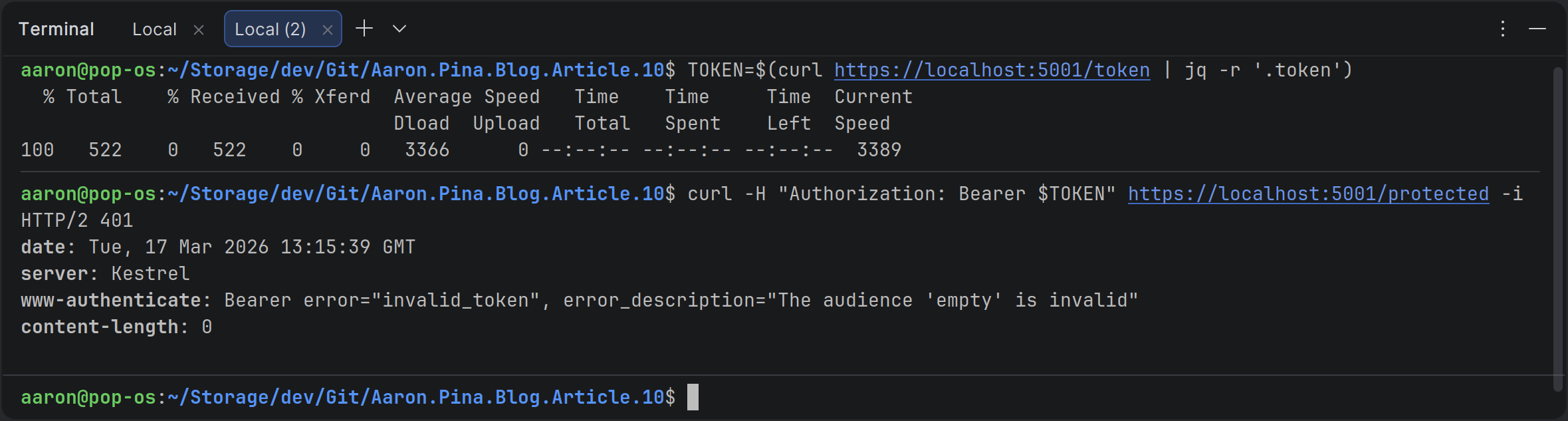
So you can see, it's telling me:
Bearer error="invalid_token", error_description="The audience 'empty' is invalid"And that's because if you look at the constructor of TokenValidationParameters, the ValidateAudience property is set to true by default.
So the defaults caught the missing audience. Good! But what if someone turns them off?
Demo #2: Disabling defaults is unsafe
Let’s see what happens when we deliberately disable audience validation.
If I just add one line to the TokenValidationParameters:
options.TokenValidationParameters = new TokenValidationParameters
{
    ValidateIssuerSigningKey = true,
    IssuerSigningKey = rsaPublicKey,
    ValidateAudience = false // ADDED THIS
};
And then run exactly the same commands, let's see what we get:
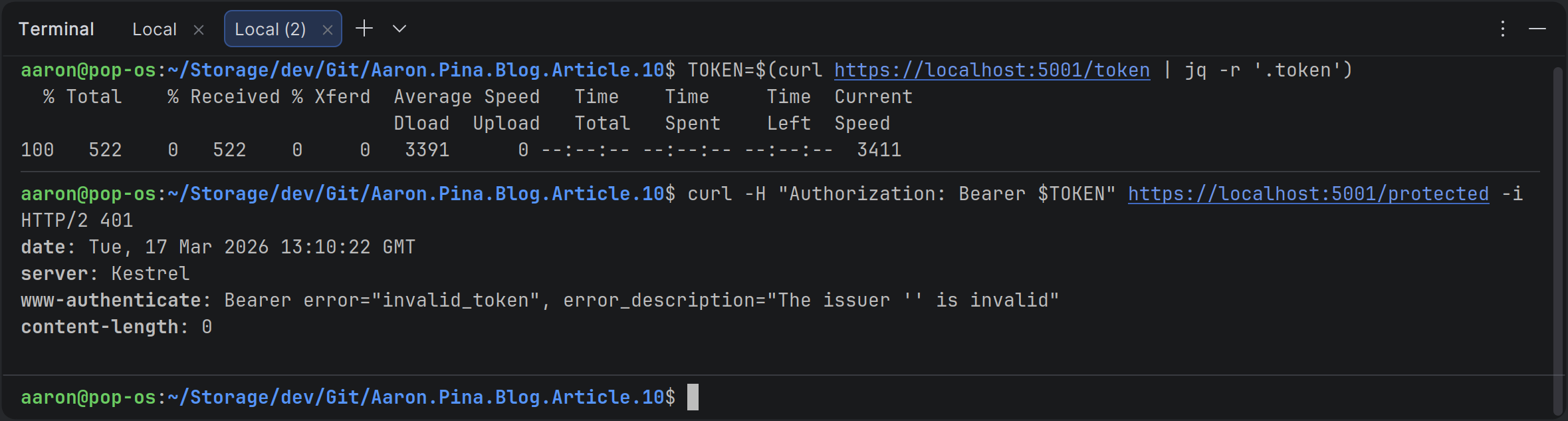
Bearer error="invalid_token", error_description="The issuer '' is invalid"And that's because ValidateIssuer is also set to true by default.
Demo #2 continued: Escalating the risk
So let's set ValidateIssuer to false too:
options.TokenValidationParameters = new TokenValidationParameters
{
    ValidateIssuerSigningKey = true,
    IssuerSigningKey = rsaPublicKey,
    ValidateAudience = false,
    ValidateIssuer = false  // ADDED THIS
};
Then let's run the same commands again and see what happens this time:
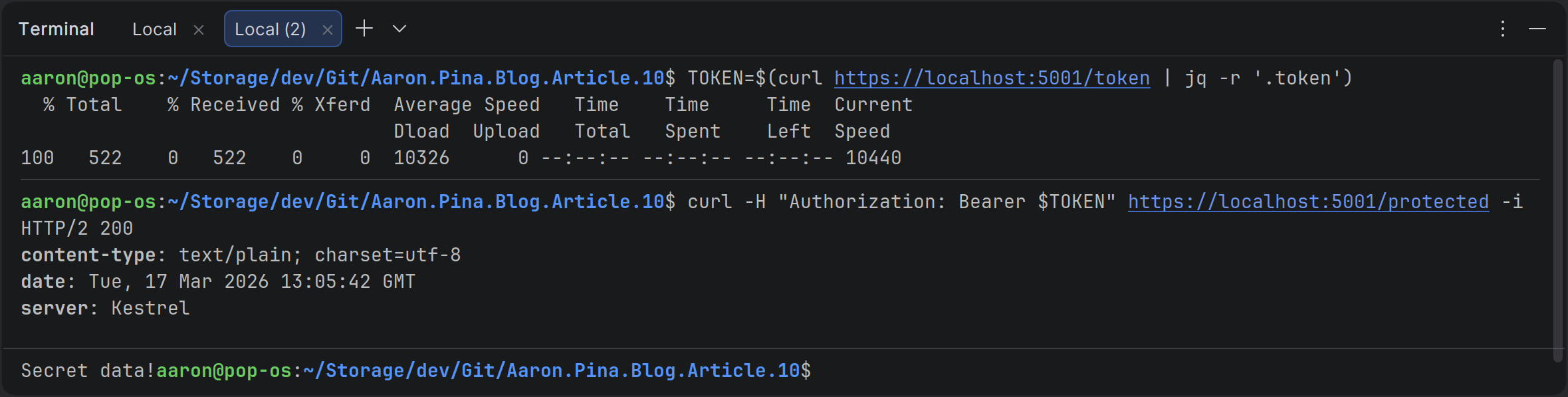
Now we get the secret data.
So it's really good that Microsoft sets audience and issuer validation to be on by default.
Please don't just turn it off because you don't know why it's there or what it does.
As I said in my previous article, when you ask the authentication server for a JWT, you need to tell it which API (which audience) you want it for. Then when you send the JWT to that API, the API should check that the audience claim in the JWT is the same as the audience defined in the API's TokenValidationParameters.
If you don't do that, someone could get a token for your "products" API and use it to access your "users" API.
This is a classic security flaw called the confused deputy problem. It allows an attacker to make a lateral move to escalate privileges. One API (the "deputy") gets tricked into using a token that was never meant for it.
In this case, your "users" API is definitely going to have a lot more sensitive information in it than your "products" API, so not setting a ValidAudience would give an attacker access to more sensitive information for nothing. That's really bad!
The same goes for the issuer. Except not validating that is even worse, because then any authentication server can issue tokens and your APIs will just accept them. It's totally unacceptable from a security standpoint.
Fixing claim validation
The correct thing to do is to allow validation and specify what to validate, like this:
var tokenDescriptor = new SecurityTokenDescriptor
{
    IssuedAt = now,
    Issuer = "auth-api",
    Audience = "auth-api",
    Expires = now.AddMinutes(30),
    Subject = new ClaimsIdentity([new Claim("sub", Guid.NewGuid().ToString())]),
    SigningCredentials = new SigningCredentials(rsaKey, SecurityAlgorithms.RsaSha256)
};
Now, the JWT is specifically defined for access to the auth-api and it was issued by the auth-api.
options.TokenValidationParameters = new TokenValidationParameters
{
    ValidateIssuerSigningKey = true,
    IssuerSigningKey = rsaPublicKey,
    ValidateAudience = true,
    ValidAudience = "auth-api",
    ValidateIssuer = true,
    ValidIssuer = "auth-api"
};
The API that is receiving the JWT is now checking the claims inside the JWT and validating that the audience is the auth-api and the issuer is also the auth-api.
Now, we have both the issuer and the audience having the same value because it's just a simple example, but you can imagine a scenario where a "documents" API is asking an "authentication" API for a JWT to access an "images" API. In which case, the JWT would look like:
var tokenDescriptor = new SecurityTokenDescriptor
{
    IssuedAt = now,
    Issuer = "auth-api",
    Audience = "images-api",
    Expires = now.AddMinutes(30),
    Subject = new ClaimsIdentity([new Claim("sub", Guid.NewGuid().ToString())]),
    SigningCredentials = new SigningCredentials(rsaKey, SecurityAlgorithms.RsaSha256)
};
And then the images API would be configured like so:
options.TokenValidationParameters = new TokenValidationParameters
{
    ValidateIssuerSigningKey = true,
    IssuerSigningKey = rsaPublicKey,
    ValidateAudience = true,
    ValidAudience = "images-api",
    ValidateIssuer = true,
    ValidIssuer = "auth-api"
};
So if you follow those guidelines, you're going to have a secure API.
Of course, there are other claims you should authenticate, such as ValidateLifetime.You should check the JWT token lifetime to make sure that you're not being passed expired tokens.
And finally, you should definitely be checking the signature on the JWT with ValidateIssuerSigningKey, to make sure it hasn't been tampered with.
Conclusion
JWTs are powerful precisely because they’re stateless and self-contained, but that same power makes them dangerous when configured carelessly. Most of the attacks we’ve covered in this article (forged signatures, “none” algorithm tricks, weak symmetric secrets, missing claim validation) happen because of lack of education. They’re the direct result of developers doing what tutorials tell them to do: copy-paste minimal code without understanding the why behind each line.
The good news is that modern .NET (especially ASP.NET Core 3+ and .NET 5+) gives you strong defaults and excellent middleware. You don’t need to become a cryptography expert overnight. You just need to be explicit about your intent: Always verify signatures, lock down allowed issuers and audiences, enforce lifetimes, and never trust human-memorable secrets.
Do those four things consistently and you’ve already blocked the vast majority of real-world JWT misuse, including the confused deputy problem that lets tokens leak sideways between your own APIs.
In the coming weeks we’ll zoom out and place all of this in proper context: How JWTs fit inside OAuth 2.0 and OpenID Connect, why real-world auth servers look different from our simple demo and how to talk sensibly about grants, scopes, refresh tokens, and token endpoints without implementing the full protocol ourselves (yet).
Key takeaways
- Signature validation is non-negotiable. Set
ValidateIssuerSigningKey = trueand useAuthorityand JWKS when possible, otherwise an attacker can tamper with claims and your API will happily accept the changes. - The “none” algorithm is dead in modern .NET, but disabling
RequireSignedTokensor using custom validators can revive it. Never do that in production. - Weak or guessable HMAC secrets are a ticking time bomb. If you must use HS256, generate 32+ random bytes with
RandomNumberGenerator.Fill(), store them securely in a Key Vault or environment variables, and rotate them regularly. Prefer asymmetric keys (RS256 / ES256) anyway; Microsoft pushes them for good reason. - Defaults help, but they’re incomplete without explicit values.
ValidateIssuerandValidateAudiencearetrueby default, but if you don’t setValidIssuerandValidAudience, the checks become mostly no-ops. Always populate the allowed values. - Audience validation prevents confused deputy attacks. A token issued for your “products” API should never work on your “users” API. Enforce aud matching; it’s the single biggest defence against lateral token misuse across your services.
- Issuer validation stops foreign tokens. Without it, any auth server (including an attacker’s) can mint tokens your API will trust. Lock it down to your trusted issuer(s).
- Lifetime matters.
ValidateLifetime = true(default) and a tightClockSkew(1–2 minutes) stops the replay of expired tokens. Pair it with short-lived access tokens in production.
You now have the tools to audit and harden any JWT based .NET API you touch. Apply them, test them (break them on purpose like we did in the demos), and you’ll be miles ahead of most copy-paste setups out there.
Enjoyed this hands-on deep dive?
Subscribe (for free) for the full series. Code-heavy guides straight to your inbox.
Questions or your own JWT experiments?
Comment below or connect on LinkedIn / X. Let's master secure .NET APIs together.